- Quick HOWTO : Ch24 : The NTP Server - Ubuntu中文
The Network Time Protocol (NTP) is a protocol used to help synchronize your Linux system's clock with an accurate time source. There are that allow the general public to synchronize with them.
- 鳥哥的 Linux 私房菜 -- NTP 時間伺服器
littlebat注:此文详细的介绍了怎样架设一个NTP服务器和linux、windows客户端系统怎么进行网络校时。
- Time Synchronisation with NTP
This page describes methods for keeping your computer's time accurate. This is useful for servers, but is not necessary (or desirable) for desktop machines.
标签:ubuntu
Ubuntu下用mplayer+firefox+mplayerplug-in+MediaPlayerConnectivity看在线电影碰到的两个问题(links for 2007-09-25)
- Ubuntu中文 论坛 :: 阅读主题 - MPlayer Couldn't resolve name for AF_INT6:...”问题的解决办法
修改/etc/mplayer/mplayer.conf文件,在文件的最后增加一行“prefer-ipv4 = 1”即可。
(tags: linux ubuntu mplayer firefox mediaplayerconnectivity)
- Mplayer sound error: "Could not open/initialize audio device -> no sound" - LinuxQuestions.org
在ubuntu linux下安装mplayer心得及问题
在网上搜索了一些资料(在linux下使用mplayer播放影音(links for 2007-09-22),linux下screen的使用及Ubuntu下安装firefox插件和MPlayer(links for 2007-09-23)),自己照着做,终于在ubuntu 6.0.6下成功安装了linux下的万能播放器mplayer。自己试着播放avi文件和wmv电影文件和mp3音乐文件效果都很不错。下面把有关心得分享一下。
1、用ubuntu的新得立包管理程序中可以方便的安装这个程序,用安装MPlayer - Ubuntu中文 介绍的方法用apt-get命令也行。但是,我发现一个问题,在我的机器上用来播放清晰度较高的avi文件时,图像缓慢,声音正常。提示好像是什么video设备选择、参数设置、或者机器慢等等。我估计是机器慢了(赛扬1G),ubuntu的二进制包不适合。通过源码安装就一切OK了。
2、通过源码安装mplayer。
1)首先,是到http://www4.mplayerhq.hu/design7/dload.html下载源码,二进制的codecs(解码器,包含各种格式的影音文件的解码)和skin(皮肤),我下载的分别是:MPlayer v1.0rc1 source(http://www1.mplayerhq.hu/MPlayer/releases/MPlayer-1.0rc1.tar.bz2),Linux x86 20061022(http://www1.mplayerhq.hu/MPlayer/releases/codecs/essential-20061022.tar.bz2),Blue(http://www.mplayerhq.hu/MPlayer/skins/Blue-1.7.tar.bz2)

2)然后,是把解压后的essential-20061022.tar.bz2下的文件全部拷贝到目录/usr/local/lib/codecs/下面;
解压MPlayer-1.0rc1.tar.bz2到~/(也可以解压到/tmp,不过开机重启后就自动消失了),先阅读里面的README,按照里面的指令依次用:./configure --enable-gui 配置,用make编译,用sudo make install安装。如果中途提示你少了这样包那样库的,你就在新得立软件包或者用apt-get命令里安装相应的东西,再不清楚就根据相应的出错信息google一下,像这样的错误“Error: The GUI requires PNG support, please install libpng and libpng-dev packages.”
可以用安装这个包解决:sudo apt-get install libpng12-dev
而这个错误:(MPlayer compiling error)“Error: X11 support required for GUI compilation”
可以通过在新得立包管理程序里安装这两个包来解决:
xorg-dev (x windows devel kit)
libgtk2.0-dev (gtk devel kit)
最后,执行的时候会提示:(http://blog.chinaunix.net/u/12859/showart_279548.html)“New_Face failed.Maybe the font path is wrong.
Please supply the text font file(~/.mplayer/subfont.ttf).”,可以这样解决:
cd /usr/share/fonts/chinese/TrueType/
cp ukai.ttf ~/.mplayer/subfont.ttf
还有,如果提示没有声音设备之类的信息,试着把设置里的声音设备改为oss的试试,我的video设备选的是xv。
于是,通过编译安装的mplayer就可以用了。
不过,两个问题依然无法解决,记录在此:
1、realplay10可能由于新安装libgtk2.0-dev之类的原因,在使用打开文件的时候会退出,估计跟字体编码有关,不过,它的功能用mplayer可以代替;下载它的源码不知怎么编译安装;好多文件夹,没有看到REAME或者INSTALL文件。
2、不能用firefox在线看电影,我安装了mplayerplug-in(用源码安装和包管理安装都试过),安装了Firefox 扩展MediaWrap 或者MediaPlayerConnectivity都不能在线看电影(如:http://hnnn.net 的)。
另外,网上的这篇类似的文章可以对照着参考:Ubuntu6.06 Linux安装Mplayer过程解析
linux下screen的使用及Ubuntu下安装firefox插件和MPlayer(links for 2007-09-23)
- 将Linux中的“工具箱”翻个底朝天 - 操作系统 - Linux
littlebat注:此文以在linux的控制台终端用mp3blaster播放音乐为例说明screen的高级应用,screen的基本用法参见:linux下的多窗口程序sceen的使用简介
(tags: linux screen mp3blaster)
- UbuntuHelp:FirefoxPlugins/zh - Ubuntu中文
本页的内容是基于Mozilla Firefox浏览器支持Ubuntu并提供技术支持的版本,例如从Ubuntu知识库(repositories)中的Firefox安装包(package)。本文假设用户使用 包管理工具来安装或升级插件。如果您使用其它
- 安装MPlayer - Ubuntu中文
littlebat注:在ubuntu下安装mplayer
linux下鼠标右键单击框架页面内的链接有时会使内容左右反转
大概1~2周前,我在Ubuntu 6.06 LTS firefox1.5下查看cnzz.com的统计页面时发现一个有趣的现象。
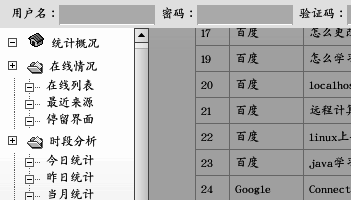
例如,我在其中查看“搜索引擎”页面时,用右键单击其中的“来源页面”的链接时,有时会出现内容左右反转的怪事。用一个ps机械鼠标和一个usb光电鼠标试了都是这样。效果截图如下:
正常页面:
反转的页面:
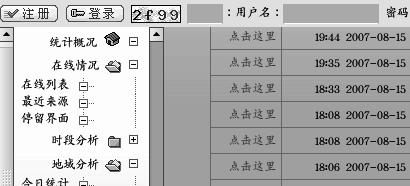
我查看了反转时的反转部分的源码,又是正常的。
cnzz.com的整个框架页面源码如下:
<HTML><HEAD><TITLE>JAVA学习日记 - 查看统计 - 站长统计 CNZZ.com</TITLE>
<META http-equiv=Content-Type content="text/html; charset=gb2312">
<META content="MSHTML 6.00.3790.2491" name=GENERATOR>
</HEAD><FRAMESET border=0 frameSpacing=0 rows=125,* frameBorder=NO cols=*>
<FRAME name=topFrame src="top.php" noResize scrolling=no>
<FRAMESET border=0 frameSpacing=0 frameBorder=NO cols=150,*>
<FRAME id=f1 name=f1 marginWidth=5 marginHeight=20 src="menu.php?web_id=258488" noResize>
<FRAME id=f2 name=window_main src="view.php?web_id=258488&method=">
</FRAMESET>
</FRAMESET>
</HTML>
框架内的页面源码也看不出什么奇怪的,真是奇怪。
tom.com邮箱无法用linux下的thunderbird邮件客户端发送
有大概2~3周了吧,我用Ubuntu 6.06 LTS 下的thunderbird邮件客户端无法发送tom.com的邮件了。
ubuntu自带的thunderbird 1.5.0.12 中文版无法发送,安装一个最新版的thunderbird 2.0.0.6 中文版也无法发送。报告错误信息如下:this mail is blocked by kbas system ...
见图:
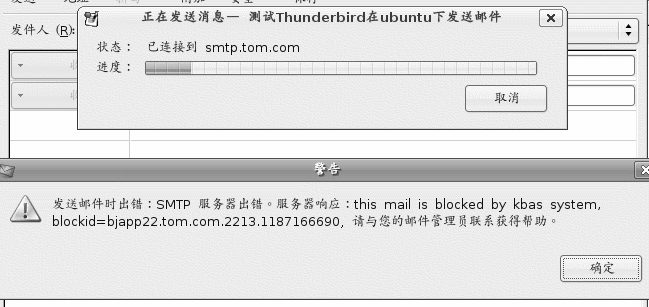
我在另外的机器上安装的redhat linux 9.0控制台下的mutt邮件客户端却可以正常使用。
另外,前者是铁通网络,后者是电信网络。
从网上查得,kbas是一个反垃圾邮件的软件系统,tom.com的邮件系统把我用thunderbird发送的正常的邮件当作垃圾邮件了 🙁 不知是thunderbird的原因?铁通网络的原因?linux的原因?还是tom.com的原因?
install ubuntu from internet, train your patient
It is a long progress to install ubuntu from internet, about 5 hours, although I install it though 1M ADSL. If there are CDROMs of ubuntu, that's a good thing. We can order it from internet without pay! Maybe, I should give a try?
Ubuntu is a beautiful linux OS. It is bases on Debian Linux and take the advantage and discard shortage of it. There are some differents between it and Redhat Linux, for example, no root user can login with normal way as it is in Redhat; we can't start a text mode linux with the way in Redhat Linux, and it take "apt" program instead of "rpm" in redhat linux to install program, etc..
I need learn the basic operations in the text mode, so I need resolve login into text mode directly in ubuntu.
In order to translate word, I register an account at http://www.iciba.com, I think I can get lots of help from this famor website:)