Redhat linux9.0下tomcat5.0.12不能在eclipse3.1中用sysdeo的tomcatPluginV31插件启动。
我现在是上述的环境,也许不限于linux, eclipse3.1和tomcat5.0.12和tomcatPluginV31,记在这里意思是说,当你在tomcat不能在eclipse中用上sysdeo的插件启动时,不妨换一个tomcat的版本。
同样是上述环境,把tomcat5.0.12换成tomcat5.0.28后就可以正常启动了。
这两天找出这个原因费了点时间,jdk, eclipse, tomcatPlugin的版本都换过了,就是没有先换tomcat的版本:),以为都是5.0.*的版本,应该没有多大区别吧。可是,问题就恰恰出在这里了。
分类:计算机
解决Redhat linux9.0下jdk1.4.2_01-b06的中文问题
这几天准备对学习日记作点小的改动(房子虽然太简单,也需要修整修整呀),把停了一个来月的学习日记开发环境在linux下搭起来了。当我运行java软件ArgoUML建模,发现不能在软件中输入汉字,保存对话框的“是”与“否”的中文字体为方框。我知道碰到了传说中的linux下java的中文乱码问题。
于是,请出google老师,他帮我找到了一篇帖子,于是,受文中的启发,在下面目录对文件font.properties.zh_CN.Redhat8.0作了一个符号链接font.properties.zh.Redhat,中文乱码问题就没有了。如下:
|
很简单吧,但是我不知道具体原因是什么。也许font.properties.zh.Redhat是Redhat系统在java中的默认字体设置文件?哪为什么在这个目录下又有这么多的字体设置文件,如下:
|
***********************************************************************************
附上那篇介绍有Redhat linux9.0下java中文设置的文章,实际上是一篇讲Redhat linux9.0下oracle安装的文章,也许以后用得着,收藏在这里参考:
转自:http://www.xxlinux.com/linux/article/development/database/20060905/3956.html
RedHat9.0操作的oracle9i安装
[ 作者:Linux联盟收集 加入时间:2006-09-05 21:52:36 来自:Linux联盟收集 ]
作者:pxe2
先安装修改java
标准 jre/jdk 中只带了 redhat 6 的 font.properties, 需要建一个 font.properties.zh.Redhat 放在 redhat 的 jre/lib 目录下。打开 /usr/lib/X11/fonts/ttf-zh 或者 /usr/share/fonts/zh_CN/TrueType 下面的 font.dir, 将其中的一个中文字体名复制下来,比如 -misc-ZYSong18030-medium-r-normal--0-0-0-0-c-0-iso10646-1,按照 java 的字体规则改为 -misc-ZYSong18030-medium-r-normal--*-%d-*-*-c-*-iso10646-1,将 font.properties.zh 中的内容复制到 font.properties.zh.Redhat 中。
我选用字体 -misc-ZYSong18030-medium-r-normal--0-0-0-0-c-0-iso10646-1 是因为在 redhat 7.3 和 redhat 8.0 上都能用。
因为 jre/jdk 找不到 Redhat 的 true type 字体,在文件 font.properties.zh.Redhat 最后加入
appendedfontpath=/usr/lib/X11/fonts/ttf-zh
appendedfontpath=/usr/share/fonts/zh_CN/TrueType
将字体名全部替换成 -misc-ZYSong18030-medium-r-normal--*-%d-*-*-c-*-iso10646-1,替换后的 font.properties.zh.Redhat 如下:
# @(#)font.properties.zh.Redhat.linux 1.4 02/06/10
#
# Copyright 2002 Sun Microsystems, Inc. All rights reserved.
#
# Component Font Mappings
#
serif.0=-misc-ZYSong18030-medium-r-normal--*-%d-*-*-c-*-iso10646-1
serif.italic.0=-misc-ZYSong18030-medium-r-normal--*-%d-*-*-c-*-iso10646-1
serif.bold.0=-misc-ZYSong18030-medium-r-normal--*-%d-*-*-c-*-iso10646-1
serif.bolditalic.0=-misc-ZYSong18030-medium-r-normal--*-%d-*-*-c-*-iso10646-1
sansserif.0=-misc-ZYSong18030-medium-r-normal--*-%d-*-*-c-*-iso10646-1
sansserif.italic.0=-misc-ZYSong18030-medium-r-normal--*-%d-*-*-c-*-iso10646-1
sansserif.bold.0=-misc-ZYSong18030-medium-r-normal--*-%d-*-*-c-*-iso10646-1
sansserif.bolditalic.0=-misc-ZYSong18030-medium-r-normal--*-%d-*-*-c-*-iso10646-1
monospaced.0=-misc-ZYSong18030-medium-r-normal--*-%d-*-*-c-*-iso10646-1
monospaced.italic.0=-misc-ZYSong18030-medium-r-normal--*-%d-*-*-c-*-iso10646-1
monospaced.bold.0=-misc-ZYSong18030-medium-r-normal--*-%d-*-*-c-*-iso10646-1
monospaced.bolditalic.0=-misc-ZYSong18030-medium-r-normal--*-%d-*-*-c-*-iso10646-1
dialog.0=-misc-ZYSong18030-medium-r-normal--*-%d-*-*-c-*-iso10646-1
dialog.italic.0=-misc-ZYSong18030-medium-r-normal--*-%d-*-*-c-*-iso10646-1
dialog.bold.0=-misc-ZYSong18030-medium-r-normal--*-%d-*-*-c-*-iso10646-1
dialog.bolditalic.0=-misc-ZYSong18030-medium-r-normal--*-%d-*-*-c-*-iso10646-1
dialoginput.0=-misc-ZYSong18030-medium-r-normal--*-%d-*-*-c-*-iso10646-1
dialoginput.italic.0=-misc-ZYSong18030-medium-r-normal--*-%d-*-*-c-*-iso10646-1
dialoginput.bold.0=-misc-ZYSong18030-medium-r-normal--*-%d-*-*-c-*-iso10646-1
dialoginput.bolditalic.0=-misc-ZYSong18030-medium-r-normal--*-%d-*-*-c-*-iso10646-1
# Missing Glyph Character
#
default.char=274f
# Component Font Character Encodings
#
fontcharset.serif.0=sun.io.CharToByteISO8859_1
fontcharset.serif.1=sun.awt.motif.CharToByteX11GBK
fontcharset.sansserif.0=sun.io.CharToByteISO8859_1
fontcharset.sansserif.1=sun.awt.motif.CharToByteX11GBK
fontcharset.monospaced.0=sun.io.CharToByteISO8859_1
fontcharset.monospaced.1=sun.awt.motif.CharToByteX11GBK
fontcharset.dialog.0=sun.io.CharToByteISO8859_1
fontcharset.dialog.1=sun.awt.motif.CharToByteX11GBK
fontcharset.dialoginput.0=sun.io.CharToByteISO8859_1
fontcharset.dialoginput.1=sun.awt.motif.CharToByteX11GBK
# Exclusion Ranges
#
# XFontSet Information
#
fontset.serif.plain=
-misc-ZYSong18030-medium-r-normal--*-%d-*-*-c-*-iso10646-1
fontset.serif.italic=
-misc-ZYSong18030-medium-r-normal--*-%d-*-*-c-*-iso10646-1
fontset.serif.bold=
-misc-ZYSong18030-medium-r-normal--*-%d-*-*-c-*-iso10646-1
fontset.serif.bolditalic=
-misc-ZYSong18030-medium-r-normal--*-%d-*-*-c-*-iso10646-1
fontset.sansserif.plain=
-misc-ZYSong18030-medium-r-normal--*-%d-*-*-c-*-iso10646-1
fontset.sansserif.italic=
-misc-ZYSong18030-medium-r-normal--*-%d-*-*-c-*-iso10646-1
fontset.sansserif.bold=
-misc-ZYSong18030-medium-r-normal--*-%d-*-*-c-*-iso10646-1
fontset.sansserif.bolditalic=
-misc-ZYSong18030-medium-r-normal--*-%d-*-*-c-*-iso10646-1
fontset.monospaced.plain=
-misc-ZYSong18030-medium-r-normal--*-%d-*-*-c-*-iso10646-1
fontset.monospaced.italic=
-misc-ZYSong18030-medium-r-normal--*-%d-*-*-c-*-iso10646-1
fontset.monospaced.bold=
-misc-ZYSong18030-medium-r-normal--*-%d-*-*-c-*-iso10646-1
fontset.monospaced.bolditalic=
-misc-ZYSong18030-medium-r-normal--*-%d-*-*-c-*-iso10646-1
fontset.dialog.italic=
-misc-ZYSong18030-medium-r-normal--*-%d-*-*-c-*-iso10646-1
fontset.dialog.bold=
-misc-ZYSong18030-medium-r-normal--*-%d-*-*-c-*-iso10646-1
fontset.dialog.bolditalic=
-misc-ZYSong18030-medium-r-normal--*-%d-*-*-c-*-iso10646-1
fontset.dialog.plain=
-misc-ZYSong18030-medium-r-normal--*-%d-*-*-c-*-iso10646-1
fontset.dialoginput.italic=
-misc-ZYSong18030-medium-r-normal--*-%d-*-*-c-*-iso10646-1
fontset.dialoginput.bold=
-misc-ZYSong18030-medium-r-normal--*-%d-*-*-c-*-iso10646-1
fontset.dialoginput.bolditalic=
-misc-ZYSong18030-medium-r-normal--*-%d-*-*-c-*-iso10646-1
fontset.dialoginput.plain=
-misc-ZYSong18030-medium-r-normal--*-%d-*-*-c-*-iso10646-1
#fontset.default=
#-b&h-lucida-medium-r-normal-sans-*-%d-*-*-p-*-iso10646-1,
#-tlc-song-medium-r-normal--*-%d-*-*-c-*-gbk-0
fontset.default=
-misc-ZYSong18030-medium-r-normal--*-%d-*-*-c-*-iso10646-1
appendedfontpath=/usr/lib/X11/fonts/ttf-zh
appendedfontpath=/usr/share/fonts/zh_CN/TrueType
使用 Installanywhere 我们编译安装程序选择 "其它 java 平台" 编译成一个 java 的 setup.jar 文件,
在 Redhat 上面写一个批处理/脚本文件, set classpath , 包含 setup.jar,
批处理/脚本文件中使用 java install 启动安装程序。
繁体中文依法炮制即可,建立 font.properties.zh_TW.Redhat 文件,将其中的字体名改为一个繁体中文字体名,
在文件末尾加上合适的 appendedfontpath
___________________________________________________________
1安装好RedHat9.0操作系统,确保安装了以下的RPM开发包
gcc
cpp
glibc-devel
compat-libstdc++
glibc-kernheaders
binutils
可以使用命令来查看是否已安装了这些包
rpm -q gcc cpp compat-libstdc++ glibc-devel glibc-kernheaders binutils
2从Oracle官方网站下载Oracle9i安装文件并使用如下命令解包
zcat lnx_920_disk1.cpio.gz | cpio -idmv
zcat lnx_920_disk2.cpio.gz | cpio -idmv
zcat lnx_920_disk3.cpio.gz | cpio -idmv
(注意磁盘空间)
然后会有Disk1 Disk2 Disk3三个子目录。
3设置内核参数
echo 4294967295 > /proc/sys/kernel/shmmax,建议放到/etc/rc.local文件里。
或
编辑/etc/sysctl.conf
kernel.shmmax=4294967295
我有512MB内存,所以设置这个数值。可根据实际情况设置。
4创建Oracle用户帐号和安装目录
在shell下,作为root
groupadd dba
groupadd oinstall
useradd -g oinstall -G dba oracle
passwd oracle
mkdir /opt/oracle
mkdir /opt/oracle/product
mkdir /opt/oracle/product/9.2.0
chown -R oracle.oinstall /opt/oracle
mkdir /var/oracle
chown oracle.dba /var/opt/oracle
chmod 755 /var/opt/oracle
5设置环境变量
编辑/home/oracle/.bash_profile文件,添加下列行
export LD_ASSUME_KERNEL=2.4.1
export ORACLE_BASE=/opt/oracle
export ORACLE_HOME=/opt/oracle/product/9.2.0
export ORACLE_SID=ora9i
export ORACLE_TERM=xterm
$ORACLE_HOME/network/admin
export NLS_LANG=AMERICAN_AMERICAN.ZHS16GBK
export ORA_NLS33=$ORACLE_HOME/ocommon/nls/asmin/data
LD_LIBRARY_PATH=$ORACLE_HOME/lib:/lib:/usr/lib
LD_LIBRARY_PATH=$LD_LIBRARY_PATH:/usr/local/lib
export LD_LIBRARY_PATH
export PATH=$PATH:$ORACLE_HOME/bin
CLASSPATH=$ORACLE_HOME/JRE:$ORACLE_HOME/jlib:$ORACLE_HOME/rdbms/jlib
CLASSPATH=$CLASSPATH:$ORACLE_HOME/network/jlib
export CLASSPATH
6安装
进入Disk1目录
./runInstaller
当link进行到61%时出现一个关于ins_oemagent错误,选择ignore,安装完后修复
当link进行到84%时出现一个关于ins_ctx错误,编辑$ORACLE_HOME/ctx/lib/env_ctx.mk文件,把$(LDLIBFLAG)dl加到以下位置
INSO_LINK=-L$(CTXLIB)$ (LDLIBFLAG)m $(LDLIBFLAG)dl处。
安装完成
修复第一个错误
在shell下,oracle用户
cd $ORACLE_HOME/network/lib
make -f ins_client.mk install
编辑$ORACLE_HOME/ctx/lib/ins_ctx文件
13-14行处
$(LINK) $(CTXHXOBJ) $(INSO_LINK)
为
$(LINK) -ldl $(CTXHXOBJ) $(INSO_LINK)
7启动数据库、监听程序、web server。
启动数据库
Sqlplus " / as sysdba"
SQL>startup
启动监听程序
lsnrctl
启动web server
cd $ORACLE_HOME/Apache/Apache/bin
./startJServ.sh'
来源:linuxfans
还有问题请来论坛寻求帮助:http://www.xxlinux.com/bbs/
winrar多卷压缩方法
我是在windows xp sp2上使用WINRAR 3.50 beta 5进行分卷压缩的。
但是,在一个文件夹上单击右键添加到rar文件是不行的。
采用以下步骤完成分卷压缩:
1、打开winrar软件:
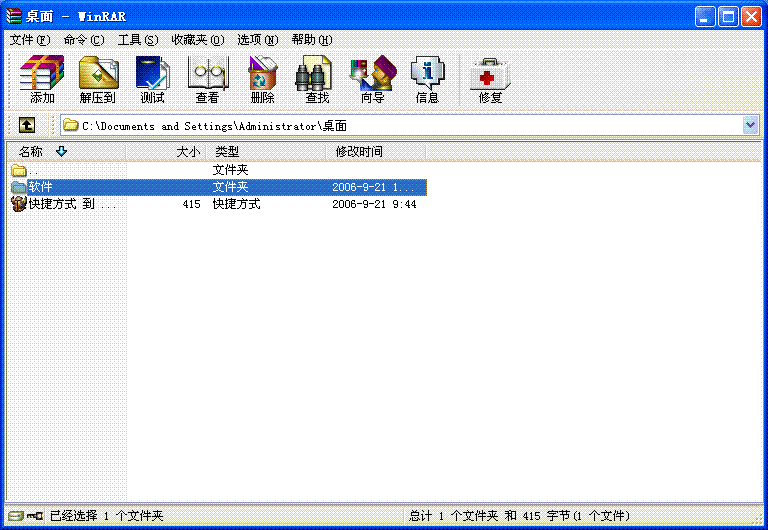
2、点击左上角的“添加”按纽:
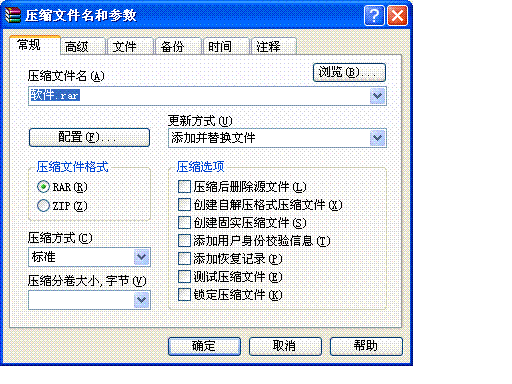
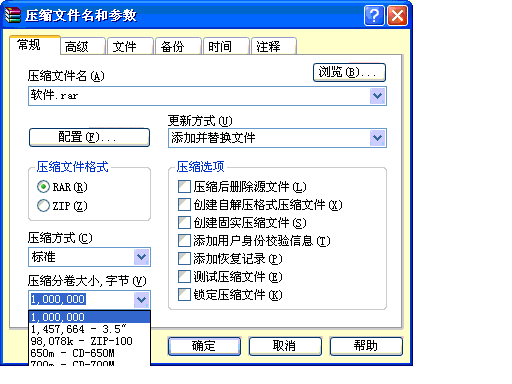
3、在“压缩分卷大小”中选择或输入每卷要压缩的大小,点击“确定”即可:
在大硬盘上安装系统记
今天在一个80G上的硬盘重新分区并用ghost镜像光盘安装windows xp sp2。碰到两个问题,记在这里交流。一个问题是:DOS自带的分区程序fdisk不能识别大硬盘;二是安装系统后用pqmagic8.0中文版无法成功一次执行完所有的分区任务;
过程如下:
1、首先在DOS状态下用fdisk删除所有原分区;
2、在DOS下用fdisk创建分区时发现fdisk不能正确的识别这个80G的硬盘,只认成了9个多G的硬盘,创建主DOS分区是把认出的“9个多G”的空间全部划给它。重启后格式化C盘用了20分钟左右,格式化完成后,系统识别出了C盘的容量为约74个G。也就是一个分区把全部硬盘的容量占完了;
3、用ghost镜像光盘安装完windows xp sp2,是ntfs格式;
4、下载pqmagic8.0中文版,安装在windows xp sp2上(pqmagic8.0中文版可以支持ntfs格式),用pqmagic8.0定好分区系列任务后,选择应用,系统重启,执行pqmagic任务失败,进入系统后仍然只有一个分区;
5、用pqmagic8.0制定一个分区任务后,即选择应用执行,(如:第一个分区任务是调整C盘的分区容量),重启系统后再用pqmagic制定执行另一个任务,终于按计划完成分区。
6、用ghost镜像备份系统盘。完成。
PS:如果有DOS下的支持大硬盘的分区程序在执行安装前完成分区,速度就可以快点,如果你碰巧手边没有这种分区软件,恐怕也只有这样了。
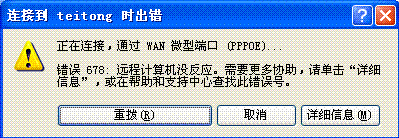
错误678:远程计算机没反应。
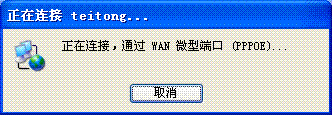
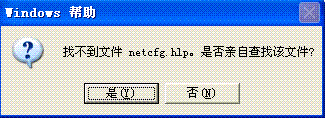
我是铁通上网,这段时间(尤其是晚上)常常不能adsl拨号连接,问了铁通的服务人员,说是我的网卡可能不稳定,还问我adsl上的LINK灯是不是亮着的,如果是亮着的,就是他们把信号送到了用户,问题在用户这方面。我对这方面的知识是一点都没有,也就不能提出什么不同的意见来。不过,(也许是巧合),有几次网络联不上发生在我在计算机上用usb接口给手机充电后。也许跟手机充电有关?但又觉得可能性不大,以前就是这样给手机充电的都没有事。又查了一下网上的论坛,在铁通的本地门户的论坛上也有朋友提出类似的问题,有的回答是adsl的model有毛病,有的说网络有问题。还是没有确切的答案。问题的屏幕截图如下:
1、
2、
3、
9.2. Manipulating Strings
9.2. Manipulating Strings
1、String Length
expr "$string" : '.*'
3、Index这个表达式跟java的用法好像不同
expr index $string $substring
Numerical position in $string of first character in $substring that matches.
|
4?{string:position:length}负数参数的用法有点怪
Extracts $length characters of substring from $string at $position.
|
而且下面这段不懂:
|
5、Example 9-12. Emulating getopt其中的字符串处理不甚明了
|
6、awk处理函数不懂
|
7、9.2.2. Further Discussion进一步讨论的几个例子没看
英语疑问:
1、emulation, getopt
A simple emulation of getopt using substring extraction constructs.
用局域网中的电脑作网关共享上网
因为不能在局域网的集线器上直接连入互联网,我于是用了一根双机互连的网线、和在局域网中的一台机子上加了一块网卡来解决了新加入机子的上网问题。
网关电脑是windows xp sp2,客户机是redhat linux9.0。
先是采用sysgate安在windows xp上,不成功。因为原来我做个网关电脑用adsl上网的双机互连共享上网,用windows xp上的共享连接不行,用sysgate才成功了。所以这次我首先就试了用sysgate共享上网。
然后,不改变两台机子互连的网卡的IP设置,在windows xp上用系统自带的internet连接共享来做。结果成功。
这两种情况成功和失败的原因都没有找到,记在这里可以作为一个小的经验吧。
9.1. Internal Variables
9.1. Internal Variables
1、不懂:
|
2、
|
3、
|
4、
|
5、
|
6、IFS是空格时,字符间的多个空格视为一个分隔符,第一个字符前面的空格会忽略不计。见例子ifs.sh。
|
运行结果:
|
7、$LINENO 不懂
|
8、$PIPESTATUS不懂,并且在本机上的执行结果与书中的不同
|
9、不懂
$PWD的:
|
10、不懂$SHELLOPTS的用法
|
11、$SHLVL的用法
|
12、$TMOUT的用法不懂,例子example9-2~9-4不懂
13、$UID,下面这段话的意思不懂
This is the current user's real id, even if she has temporarily assumed
another identity through su.
14、example9-7太复杂了,留在这里备忘
|
15、set命令的用法
|
16、$!的用法
书上的例子:
|
英语疑问:
1、subtleties, nuances
This requires learning their subtleties and nuances.
2、necessarily
$SHELL does not necessarily give the correct answer.
3、collation order, mishandled
$LC_COLLATE
Often set in the .bashrc or /etc/profile files, this variable controls
collation order in filename expansion and pattern matching. If mishandled,
LC_COLLATE can cause unexpected results in filename globbing.
4、revert, customary
To revert to the customary behavior of bracket matching, set LC_COLLATE to C by an export LC_COLLATE=C in /etc/profile and/or ~/.bashrc.
5、expedient
In a script, it may be expedient to temporarily add a directory to the path
in this way.
6、likewise
$SHELL, the name of the user's login shell, may be set from /
etc/passwd or in an "init" script, and it is likewise not a
Bash builtin.
8.2. Numerical Constants
8.2. Numerical Constants
1、Example 8-4. Representation of numerical constants
同C语言一样,字符也是整数。但是@和_代表是多少不知道?而且把它们转化为十进制的方法忘记了。
32 let "b64 = 64#@_"
33 echo "base-64 number = $b64" # 4031
34 # This notation only works for a limited range (2 - 64) of ASCII characters 35 # 10 digits + 26 lowercase characters + 26 uppercase characters + @ + _
36
37
38 echo
39
40 echo $((36#zz)) $((2#10101010)) $((16#AF16)) $((53#1aA))
41 # 1295 170 44822 3375
英语疑难: evaluates
A number with an embedded # evaluates as BASE#NUMBER (with range and notational restrictions).
8.1. Operators
Chapter 8. Operations and Related Topics
8.1. Operators
1、Example 8-1. Greatest common divisor最大公约数的算法不懂,里面的练习:判断命令行参数是否是整数不懂,记在这里。
2、发现一个问题,bash的算术操作符只能进行整数的运算,要进行其它的复杂点的运算:如开方、小数等怎么办呢?
3、Example 8-2. Using Arithmetic Operations
这个例子有不少地方不明白,记在这里以后进一步解决:
我知道 let "z = 2 + 3" 相当于 (( z = 2 + 3 )),根据:
|
1)、
|
2)、 20 n=$(($n + 1))
3)、
23 : $[ n = $n + 1 ]
24 # ":" necessary because otherwise Bash attempts
25 #+ to interpret "$[ n = $n + 1 ]" as a command.
26 # Works even if "n" was initialized as a string.
4)、
29 n=$[ $n + 1 ]
30 # Works even if "n" was initialized as a string.
31 #* Avoid this type of construct, since it is obsolete and
nonportable.
32 # Thanks, Stephane Chazelas.
5)、 44 : $(( n++ )) # : $(( ++n )) also works.
6)、 47 : $[ n++ ] # : $[ ++n ]] also works
4、bash不能处理浮点数:
|
5、
if [ $condition1 -a $condition2 ] 相当于 if [[ $condition1 && $condition2 ]]
,但是&&不能用在[...]结构中,这些有什么规律吗?真不好掌握啊。
6、Example 8-3. Compound Condition Tests Using && and ||
|
我不懂&&在6行和17行有什么区别?
7、不懂 $((...))的用法
|
英语疑问:
1、Modulo turns up surprisingly often in various numerical recipes.
2、erroneous
An operation that takes a variable outside these limits will give an erroneous result.
3、flip, relevant, fly
"Bit flipping" is more relevant to compiled languages, such
as C and C++, which run fast enough to permit its use on the fly.
4、miscellaneous operators
5、evaluated
All the operations are evaluated (with possible side effects), but only the last operation is returned.